Steering Pipelines

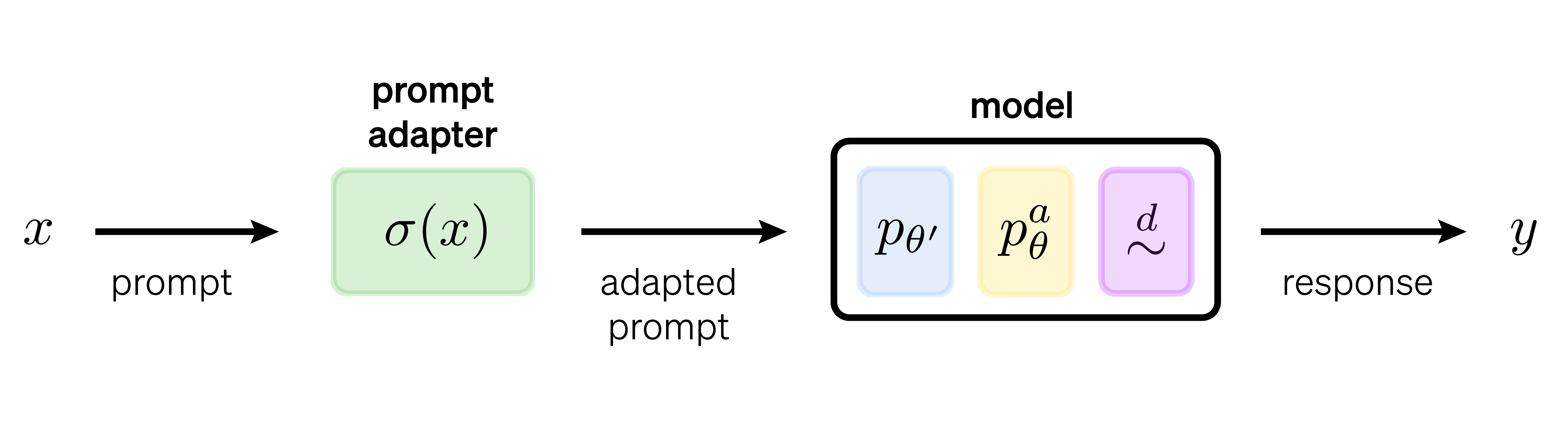
The structure of a steering pipeline.
Steering pipelines allow for the composition of multiple controls (across the four control types) into a single steering operation on a model. This allows individual controls to be mixed to form new steering interventions.
Steering pipelines are created using the SteeringPipeline class. The most common pattern is to specify a Hugging Face
model name via model_name_or_path along with instantiated controls, e.g.,
few_shot and dpo, as follows:
from steerability.algorithms.core.steering_pipeline import SteeringPipeline

pipeline = SteeringPipeline(
    model_name_or_path="meta-llama/Llama-2-7b-hf",
    controls=[few_shot, dpo]
)
Note
Some structural controls (e.g., model merging methods) produce a model as output rather than modifying/tuning an
existing model. In these cases, the steering pipeline is initialized without the model_name_or_path argument,
and the structural control supplies the model during the steer step.
Composing controls
A pipeline may contain any number of controls in every category. The categories are applied in a fixed order
(structural, then input, then state, then output) such that later categories always see the final model. Within a
category, controls are applied in the order they appear in the controls list. What it means for two controls to
compose depends on what the category edits.
Input controls chain on the prompt. On chat input, every control first has the opportunity to edit the messages
through adapt_messages. The result is then rendered through the chat template and tokenized once, and every control
that did not edit the messages applies its token-level adapt to the token stream. On text or tensor input there is no
message phase and only adapt runs. Each control is applied exactly once per generation. Since the message phase
precedes the token phase, a message-level control takes effect before a token-level control even when it is listed
after it. We recommend placing semantic rewriters (PRewrite, CPO, GEPA) before surface formatting (FewShot),
since a rewriter trained on bare instructions degrades on exemplar-prepended input.
Structural controls thread the model. Each control's steer() receives the model (and tokenizer) returned by the
previous control, and nothing implicit happens between stages, i.e., no adapter merging and no embedding-resize
reconciliation. Compatibility between stages, e.g., passing a PEFT-wrapped model into a second trainer, is the user's
responsibility. Note that the TRL wrapper controls load their own base model when base_model_name_or_path is set in
their args, which discards the threaded model. Downstream structural controls should therefore leave
base_model_name_or_path unset.
State controls register their hooks in list order. PyTorch forward hooks chain, i.e., a later hook receives the output
of the previous hook, which makes a combination such as "control A then control B at layer 12" well-defined. It also
means that pairs of edits that do not commute (e.g., ablation followed by addition versus addition followed by ablation)
are order-sensitive. An ActivationAdapter steers a single behavior, and steering with several behaviors is several
adapters in the controls list.
Output controls compose at the step level but not at the loop level. Most output controls supply logits processors
and/or stopping criteria. The pipeline gathers these in list order, appends any logits_processor or
stopping_criteria passed to generate(), and applies the combined result in every forward pass. The decode loop
itself is owned by at most one DecodingDriver, and supplying two enabled drivers raises an error at construction
since two decoding procedures cannot both control generation. With no driver present, the loop defaults to the model's
own generate, and a pipeline with no output controls decodes exactly as the base model does. Because step-level
controls compose while the loop has a single owner, a step-level control such as RAD also applies inside every rollout
that a driver such as DeAL issues. Step-level logits processors also apply during compute_logprobs, which means that
scoring reflects the steered next-token distribution. A control can set include_in_scoring=False to opt out of
scoring, e.g., when the per-position cost is prohibitive.
Steering the pipeline
Before a steering pipeline can be used for inference, all of the controls in the pipeline must be prepared and applied
to the model (e.g., training logic in a DPO control, or subspace learning in the SASA control). This step is referred
to as the steer step and is executed via:
pipeline.steer()
Calling the steer() method on a pipeline instance invokes the steering logic for every control in the pipeline.
Methods are steered independently. The effect of composing steered/trained controls is one of the main
functionalities provided by the toolkit. Note that the steer() step can be resource-heavy, especially if any
control in the pipeline requires training. Steering must be called before using the pipeline for inference, and a
repeated steer() call is a no-op.
Execution backends
Pipelines execute on a configurable backend. By default, the pipeline loads and runs the model in process (via
Hugging Face transformers). Passing backend= selects the offline vLLM engine (kind="vllm") or a
running vLLM server (kind="vllm-serve").
Not every control configuration can run on every backend. For instance, a state control whose edit has no serialized
form cannot be hosted by an engine. Each control's Backends line in steering controls records where it
is supported. Before any model or engine work, pipeline.check() reports every unsupported (control, phase) pair
together with the gap and the fix, and steer() runs the same check and raises an error on failures.
from steerability.algorithms.core.execution import BackendSpec

pipeline = SteeringPipeline(
    controls=[caa],
    backend=BackendSpec(
        kind="vllm",
        model="meta-llama/Llama-3.1-8B-Instruct",
        options={"hook_plugin": True},
    ),
)
report = pipeline.check()  # optional standalone check (steer() runs it and raises an error on failures)
report.plan               # where each control's steer step and each fit will run
The above fits caa through the engine's hidden-state capture and generates through the vLLM-Hook plugin.
Scoring
Scoring through compute_logprobs with intervention controls runs in process only. Remote prompt-logprob scoring
anchors token scopes at the end of the prompt-plus-reference concatenation rather than at the end of the prompt, which
would misplace prompt-relative interventions. Likewise, an enabled output control with include_in_scoring=True makes
the score phase unsupported on backends without in-process torch, and encoder-decoder scoring is in-process only.
Model access during steering
Each control declares what its steer step needs from the model through steer_access(). The levels are cumulative:
facts (the model layout and a tokenizer), rollouts (generation and scoring), capture (hidden-state capture), and
module (the model as a loaded torch.nn.Module). On the in-process backend, every level is served by the loaded
model. On an engine backend, the lower levels are served through the engine session where the engine supports them,
and the remaining steps (every module step, and hidden-state capture when the engine cannot return it) run on a
temporary in-process copy that is loaded, used, and freed before the engine boots. The exported
artifacts are then handed to the engine, and the in-process weights and the engine-served weights never coexist.
Setting fit="in_process" forces every fit onto the temporary copy for engine-independent numerics, and a calibrated
artifact fitted in process while its reads happen on an engine warns that its thresholds may shift. The plan returned
by check() states where each step will run.
Lifecycle
Backends are constructed lazily per pipeline and cached by spec. SteeringPipeline.release_backends(), or using the
pipeline as a context manager, releases every backend the pipeline constructed and shuts engine-owning backends down
deterministically rather than waiting for garbage collection. A released pipeline stays usable, since the next
operation reconstructs the backends against the same specs. The SteeringEval runner releases each configuration's
backends automatically after its trials. Because the offline engine's release is process-global with respect to vLLM
distributed state, it assumes no other running vLLM engine in the process.
with SteeringPipeline(controls=[caa], backend="vllm") as pipeline:
    pipeline.steer()  # fits run on the temporary copy or through the engine session, per the steer plan
    response = pipeline.generate(text="...", max_new_tokens=64)
# the engine is shut down on exit
Evaluation
The SteeringEval runner forwards its backend and fit arguments to the pipelines it builds and checks support over
every sweep point (via SteeringPipeline.check()) before any model or engine work. A sweep point that is unsupported
on the configured backend either fails the whole run (on_unsupported="raise", the default) or is skipped with a
warning (on_unsupported="skip").
Running a server
The offline vLLM engine (BackendSpec(kind="vllm")) boots vLLM inside the current process and needs no server, which
makes it the natural path for single-process runs. The serve backend targets a vLLM server you launch yourself, which
suits a remote GPU box, one server shared across processes or evaluation runs, a client with no local vLLM install, or
process isolation from the steering client.
vLLM reads some settings from environment variables only. The offline backend therefore applies a scoped boot
environment around engine construction and restores it afterwards. A launched server needs the same environment, which
serve_environment() returns for a vllm serve process. Note that the boot environment defaults the FlashInfer sampler
off (see installation). Start a server with
VLLM_HOOK_WORKER=unified VLLM_USE_FLASHINFER_SAMPLER=0 vllm serve <model> --port 8000 --enforce-eager
(with any extra engine flags), then target it with a spec that sets base_url:
from steerability.algorithms.core.execution import BackendSpec

spec = BackendSpec(
    kind="vllm-serve",
    model="meta-llama/Llama-3.1-8B-Instruct",
    options={"base_url": "http://localhost:8000"},
)
Serving activation interventions through the vLLM-Hook plugin additionally requires the plugin in the serving
environment, VLLM_HOOK_WORKER=unified and eager execution on the server, and hook_plugin: True on the spec.
Artifacts reach the server either through artifact_dir, the server's registry directory (its
VLLM_HOOK_REGISTRY_DIR) on a filesystem shared with the client, or, without artifact_dir, over the server's artifact
route.
Running inference on the pipeline
Once the pipeline has been steered, inference can be run using the generate() method. The prompt source is declared
by keyword, with exactly one source per call: text= for a str or list[str], messages= for one conversation
(a sequence of chat-message mappings) or a batch of conversations, and input_ids= for a pre-tokenized 1-D/2-D
integer tensor. attention_mask is valid only alongside input_ids=, and is derived automatically for text= and
messages=. A positional str/list[str] is also accepted as a convenience for text prompts.
Unlike bare model.generate, the returned token ids exclude the prompt by default. Pass return_full_sequence=True
for prompt-plus-continuation output. The text= and messages= paths tokenize for you, allowing chat to be passed
directly:
output = pipeline.generate(
    messages=[{"role": "user", "content": PROMPT}],
    max_new_tokens=20,
)
On the Hugging Face backend, batched prompts are left-packed internally for correct causal generation. Callers do
not need to set the tokenizer's padding_side.
For reasoning models that toggle thinking through a chat-template keyword, we pass chat_template_kwargs alongside
messages=. Since this mapping is forwarded to apply_chat_template and is not interpreted by the toolkit, the keys
are whatever the model family expects (for example enable_thinking). It is valid only with messages=, and pairing
it with text= or input_ids= raises a TypeError.
output = pipeline.generate(
    messages=[{"role": "user", "content": PROMPT}],
    chat_template_kwargs={"enable_thinking": False},
    max_new_tokens=20,
)
To tokenize explicitly and pass token IDs, encode via the pipeline's tokenizer, applying the chat template if available:
tokenizer = pipeline.tokenizer
chat = tokenizer.apply_chat_template(
    [{"role": "user", "content": PROMPT}],
    tokenize=False,
    add_generation_prompt=True
)
inputs = tokenizer(chat, return_tensors="pt")
Inference can then be run as usual, for instance:
gen_params = {
    "max_new_tokens": 20,
    "temperature": 0.6,
    "top_p": 0.9,
    "do_sample": True,
    "repetition_penalty": 1.05,
}

steered_output_ids = pipeline.generate(
    input_ids=inputs.input_ids,
    **gen_params,
)
On the default in-process backend, steering pipelines accept any of the generation parameters available in
Hugging Face's GenerationConfig class,
including the generation strategies for custom decoding.
Generation parameters are normalized across backends. The sampling-facing subset (e.g., max_new_tokens,
temperature, top_p, stop_strings) is portable, while parameters outside it pass through to model.generate in
process and raise an error on the vLLM backends.